iPhone Data Recovery on Windows (The Complete Guide)



iPhone data recovery has a dirty secret the ads never mention. Nothing gets resurrected. Every successful recovery, every single one, works by finding a copy that already exists somewhere, in a holding folder, in a backup or on another device. Once you know where those copies live, recovery stops being magic and becomes a short, orderly search. This hub maps every hiding place and routes you to the exact guide for your situation.
Summary
iPhone data recovery means locating an existing copy of your data. Check the on-device Recently Deleted folders first, then computer backups, which a backup viewer reads on Windows without touching the phone. iCloud helps for contacts and full restores. Nothing recovers data that has no copy anywhere.
| What You Lost | Start Here |
|---|---|
| Text messages or iMessages | Recover deleted text messages |
| Photos or videos | Recover deleted photos |
| Contacts | Contacts disappeared fixes |
| WhatsApp chats | Export WhatsApp from a backup |
| Everything, phone broken or lost | Recover data from a broken iPhone |
Table of Contents
What Does iPhone Data Recovery Actually Mean?
Three kinds of copies exist. Every recovery method on the internet reduces to reaching one of them. First, the phone’s own safety nets. iOS quietly holds deleted messages and photos in Recently Deleted folders for weeks before letting go of them. Second, backups. Every backup your computer or iCloud made is a frozen snapshot of the whole phone from that day. Deletions afterward change nothing inside it. Third, other devices and other people, from a synced iPad to the friend whose phone still shows your whole conversation.
The order matters. Safety nets expire in weeks, so they come first. Backups never expire, so they carry everything older. And the honest boundary sits right behind them both. Data with no copy in any of the three places has nothing left to recover, whatever an ad promises.
What Can You Recover Without a Computer?
Messages. Open Messages, tap Edit, then Show Recently Deleted. Apple holds deleted messages for 30 to 40 days on iOS 16 and later. The full ladder lives in our guide to recovering deleted text messages.
Photos. The Photos app keeps its own Recently Deleted album for about 30 days, behind Face ID. Past that window, chat attachments become the surprise second chance, mapped in our guide to recovering deleted photos.
Contacts. Contacts play by sync rules instead of deletion rules. iCloud.com keeps dated recovery archives that roll your whole contact list back in one move. Our guide to disappeared iPhone contacts walks every account toggle first, since most vanished contacts were never deleted at all.
How Does iPhone Data Recovery from a Backup Work?
Once the on-device windows close, iphone data recovery runs through your backups. This is where Windows users hold a quiet advantage. Local backups sit right on the PC, findable through our map of where iPhone backups are stored on Windows. Everything inside them, itemised in our pillar on what an iPhone backup contains, is reachable two different ways.
The official way is a full restore, covered step by step in our guide to restoring an iPhone from a backup. It brings back everything from the backup date and erases everything after it, an acceptable trade after a catastrophe and a terrible one for a single lost conversation.
The surgical way reads the backup without touching the phone. iData Backup Viewer opens any local backup on Windows 10 or 11 and lays out the messages, photos, contacts, call history, notes and WhatsApp chats inside. You browse and confirm your lost data is present, free. Then you export only what you need. No restore, no wipe, no gamble. Encrypted backups open with their password and reveal even more, since Apple adds health data and saved passwords to encrypted backups only.
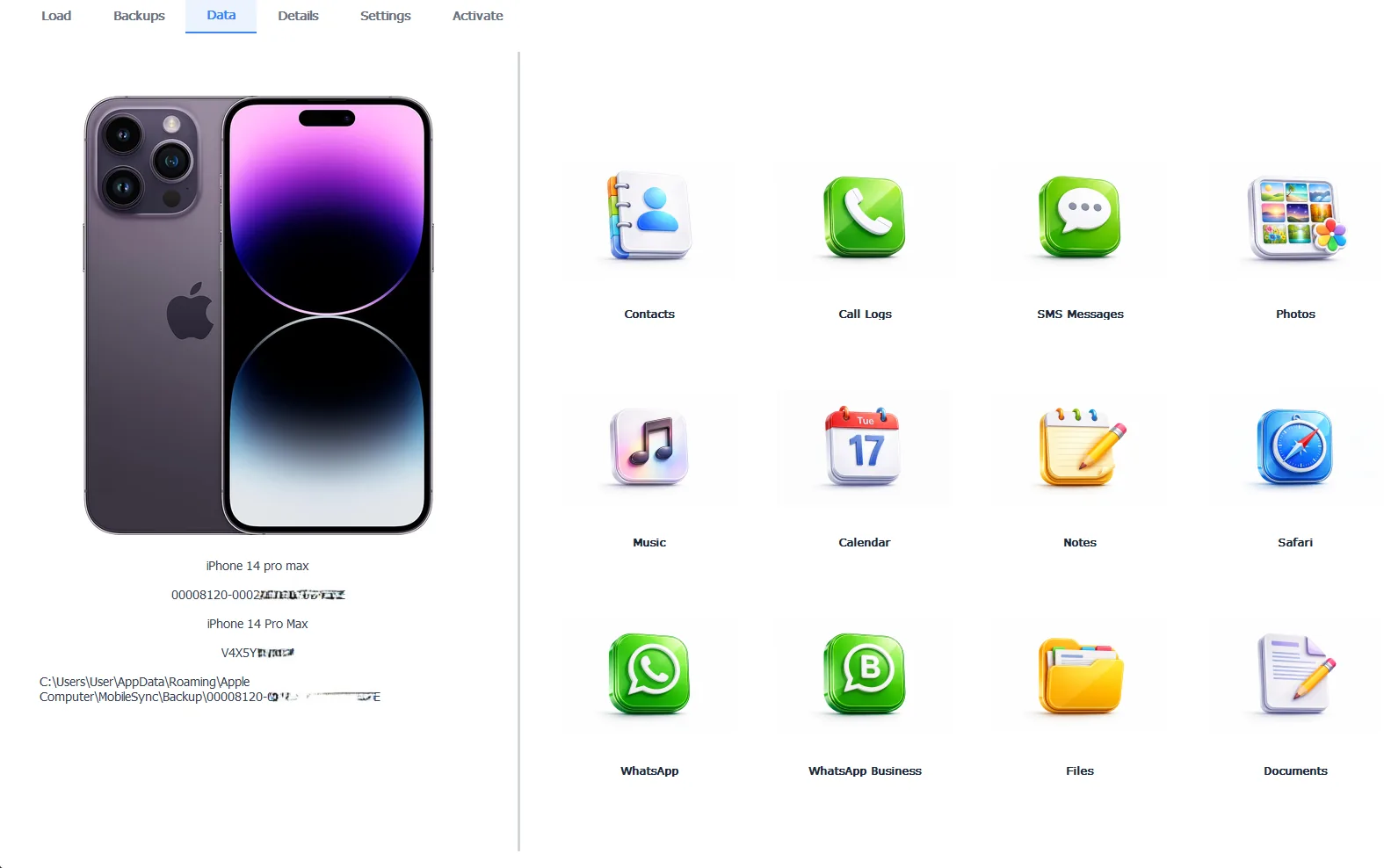
A full backup opened for recovery, every category browsable
The preview costs nothing, exporting takes the Pro edition at $49 per year and every byte stays 100% local to your machine.
Free version previews your backup contents. Works on Windows 10 and 11.
“Recovery isn’t surgery, it’s a search. The data either has a copy somewhere or it doesn’t. Our job is showing people the three places copies hide, because the most common recovery story we see is someone discovering the backup on their own laptop held everything they’d mourned for months.”
Viralkumar Patel in | iData Backup Viewer Team, CYBERSICS SOLUTIONS
What If the iPhone Is Broken or Gone?
A shattered, drowned, stolen or simply dead iPhone changes nothing about the backups it left behind. They sit on your PC as complete stand-ins for the device. Everything reads and exports exactly as if the phone were fine. Our guide to recovering data from a broken iPhone runs the full four-rung ladder for that scenario, including the repair-shop questions worth asking and the recovery-service claims worth doubting.
What If the Backup Itself Is the Problem?
Two failures dominate. A backup iTunes calls corrupt or not compatible refuses to restore. Its files remain largely intact though and a viewer can still pull data straight out of it, the exact playbook in our guide to fixing a corrupt iTunes backup.
A forgotten password locks an encrypted backup instead. No honest tool cracks it, but resets, password manager digs and unlimited guessing attempts each offer a way through, all mapped in our complete guide to the iTunes backup password. Keep the locked backup either way. Remembered passwords have rescued years-old backups.
What Can’t Be Recovered?
The honest list is short and worth knowing before spending money. Data deleted past its holding window with no backup made while it existed has no copy left. No software changes that. Tools claiming to deep-scan a live iPhone for long-gone data are dressing up impossibility as a product, since iOS walls off the databases they’d need and recycles freed space quickly.
Backups also exclude a few things by design, like content that lives only in iCloud streams and settings Apple regenerates. The full exclusion list sits in the pillar on what an iPhone backup contains. Knowing the boundary saves you from the one genuinely unwinnable fight in this whole subject.
So that’s the whole territory. Two on-device folders with expiry dates, backups that never expire, an iCloud archive for contacts, one honest boundary behind it all. Pick your row in the table up top, follow its guide and check the copy locations in order.
Which of the three hiding places have you not checked yet?
Frequently Asked Questions
Is iPhone data recovery free?
Checking is free at every stage. Recently Deleted folders cost nothing, iCloud.com costs nothing and iData Backup Viewer previews your entire backup for free. Paying only enters the picture when you want recovered data exported out.
Can I recover iPhone data without any backup?
Within the holding windows, yes. Messages stay in Recently Deleted for 30 to 40 days and photos for about 30. Past those windows with no backup anywhere, the honest answer is that the data is gone.
Does iPhone data recovery software really work?
Software that reads backups works, because the data verifiably sits in the backup. Software claiming to scan a live iPhone and resurrect long-deleted data without any backup is promising something iOS does not permit.
How far back can recovery reach?
As far back as your oldest backup. Backups never expire, so a five year old backup on a forgotten laptop still opens today and still contains everything from that day.
Can data be recovered from an encrypted backup?
Yes, with its password. Encrypted backups actually hold more recoverable data than plain ones, including saved passwords and health records, which makes them the better source when both exist.
What about a phone that is broken or gone?
The backup becomes the phone’s stand-in. Everything inside it can be read and extracted on your PC whether the iPhone that made it still powers on or not.
Written by Viralkumar Patel in
Viralkumar works on iData Backup Viewer at CYBERSICS SOLUTIONS, where he helps Windows users read, recover and export data from iPhone backups.