iTunes Backup Session Failed? Every Fix That Works



iTunes could not back up the iPhone because the backup session failed. No code, no culprit, no next step, just a shrug in dialog form. The itunes backup session failed error is the vaguest one Apple ships. Behind the vagueness sit seven specific causes, each with its own tell. Work them in order below and the session that keeps dying finishes tonight.
Summary
To fix the iTunes backup session failed error, restart the iPhone and the PC, then retry on the original cable in a rear port. Persisting failures respond to emptying the Lockdown pairing folder, excluding MobileSync from antivirus scans and retiring a damaged old backup folder so the next run builds fresh.
| When the Session Dies | The Usual Suspect |
|---|---|
| Immediately at the start | Stale pairing records or full disk |
| Somewhere different each run | Cable, hub, antivirus or PC sleep |
| Same late stage every run | Damaged existing backup folder |
| Only on very long first backups | Windows sleep ending the session |
Table of Contents
What Does the Backup Session Failed Error Mean?
A backup session is the entire conversation, handshake to final write, between iTunes and the iPhone. The error announces that the conversation collapsed somewhere without saying where, which makes it a symptom shared by seven different diseases. The useful diagnostic is the timing. Where in the run the session dies points at the cause, per the table above.
Two comforts before the ladder. The data on the phone is untouched, since backups only read from it. And every cause on the list is fixable at home tonight, no service counter involved.
How Do You Fix the iTunes Backup Session Failed Error?
- Restart both machines. Power the iPhone fully off and on, restart the PC, retry. Stale state on either side causes more session failures than everything else combined.
- Fix the transport. Original cable, rear USB port, no hub. A phone that also flickers in and out of iTunes belongs in our guide to iPhones not showing up in iTunes first.
- Keep the PC awake. Long sessions die when Windows sleeps, so set sleep to Never for the evening under Settings, then System, then Power.
- Exclude MobileSync from antivirus scanning and restore anything already quarantined, the interference Apple’s troubleshooting page singles out.
- Check free space on C:. A backup needs room roughly matching the iPhone’s used storage.
- Reset the pairing records. Close iTunes, open the folder below, delete its contents but not the folder, reconnect the phone and tap Trust when asked.
ProgramData hides by default, so paste the path straight into the File Explorer address bar. Emptying Lockdown forces Windows and the iPhone to rebuild their trust from scratch, which clears the stale-handshake class of session failures completely.
Still failing after all six? The last suspect is the existing backup itself, which gets the next section to itself.
Why Does the Old Backup Folder Break New Sessions?
Sessions never start from zero. Each run updates the device’s one backup folder in place, reading what’s there and writing the changes, so a folder damaged by some long-forgotten interrupted run becomes a landmine every new session steps on. The tell is unmistakable, death at the same late stage every time.
The fix respects your history. Copy the device folder somewhere safe, rename the original, then run the backup again. With no folder to build on, the session writes a complete fresh backup and the landmine is gone. The damaged copy still holds readable data, recoverable through our guide to fixing a corrupt iTunes backup. And when failures follow other patterns entirely, the wider map in iPhone backup keeps failing sorts every recurring case.
How Do You Protect the Last Good Backup First?
Before any experiment above, insure the one thing that matters. In-place writing means a session that dies mid-run can degrade the last complete backup on the machine, so copy the current device folder to another drive first, whole, two minutes of drag and drop.
Then confirm the insurance pays. iData Backup Viewer opens the copied backup on Windows 10 or 11 and shows the messages, photos, contacts and everything else inside, free. A backup that displays your life is real insurance. One that won’t open means the damage already happened, moving today’s priority from fixing sessions to extracting data, the route our iPhone data recovery hub maps.
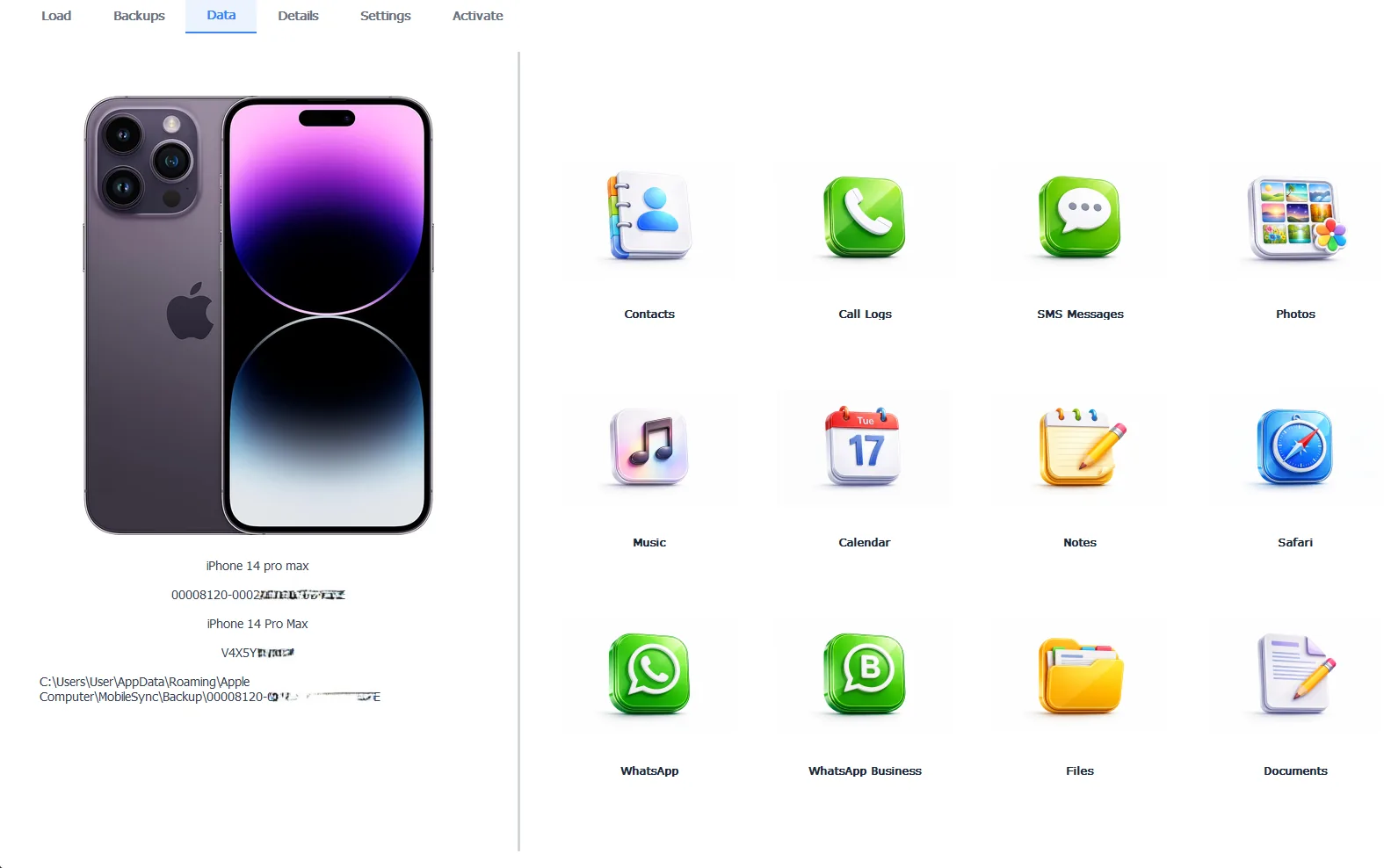
The archived backup, verified readable before any session experiments
Browsing is free, exporting takes the Pro edition at $49 per year and everything stays 100% local.
Free version previews your backup contents. Works on Windows 10 and 11.
“Session failed is iTunes admitting it doesn’t know what happened. The timing knows. Instant death is a handshake or disk problem, wandering death is the environment, same-stage death is the old folder. People fight this error for weeks when the failure pattern named the fix on day one.”
Viralkumar Patel in | iData Backup Viewer Team, CYBERSICS SOLUTIONS
What If Nothing Completes Before Something Important?
Sometimes the session fights arrive the night before an update, a repair appointment or a trade-in, with no time to win them. Triage honestly. First verify the newest existing backup opens and holds your recent life, which converts it from hope into a real safety net. Second, let iCloud run a stopgap backup overnight on Wi-Fi and power, imperfect but better than nothing. Then hand the phone over knowing something readable exists. Settle the session error afterward with the full guide to backing up an iPhone to a computer.
So decode the shrug. Restart, transport, sleep settings, antivirus, disk space, Lockdown reset, then retire the damaged folder, protecting the last good backup before anything else. Seven suspects, one timing clue and every single one fixable at your own desk.
At which stage does your session die and did you notice before tonight?
Frequently Asked Questions
What does the backup session failed error actually mean?
The entire backup conversation between iTunes and the iPhone collapsed without either side naming a culprit. It’s iTunes’ vaguest error on purpose, which is why the fix is a ladder rather than a single switch.
Does a failed session damage my phone or my existing backup?
The phone, never. The existing backup, possibly, since sessions write into that folder in place and a mid-write collapse can leave it mixed. Copying the current backup folder aside before retrying protects against exactly that.
What is the Lockdown folder?
Windows keeps the pairing records that let iTunes talk to trusted iPhones in C:\ProgramData\Apple\Lockdown. Stale records there break backup sessions, so emptying the folder and re-trusting the phone rebuilds the handshake fresh.
Why does my backup fail at the very end every single time?
Same-stage failure is the signature of a damaged existing backup folder, hit at the same point in every run. Archive that folder elsewhere, rename it and the next session builds fresh from nothing.
Will deleting the old backup fix the session error?
Renaming or moving it works just as well and keeps your history. Delete the old folder only after a new backup completes and proves readable, never before.
Can the PC going to sleep interrupt a backup session?
Yes. First backups of full phones run long and Windows sleep settings end them mid-session. Keep the PC awake for the duration, then let the power plan go back to normal.
Written by Viralkumar Patel in
Viralkumar works on iData Backup Viewer at CYBERSICS SOLUTIONS, where he helps Windows users read, recover and export data from iPhone backups.